What Does Your Phone Number Reveal About You Online?
Enter your own number and see what a stranger could find: the public social profiles linked to it, free preview first.
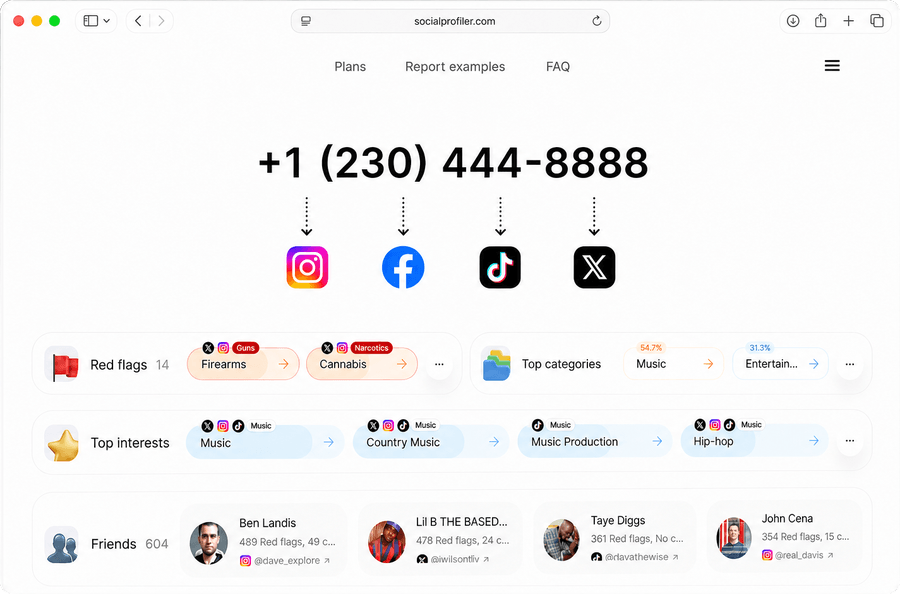
Your phone number may feel private because it is not written in your Instagram bio or displayed beside every TikTok. That does not necessarily mean it has no connection to your online identity.
Check Your Own Number
A normal social media review begins with accounts you already remember. A phone-number self-audit begins somewhere less comfortable: with the only information a stranger may have.
Use the current number that people associate with you. If you have kept the same number for years, it may connect to accounts created under old usernames, previous surnames, former businesses, or profiles you no longer use. If the number is new, an unfamiliar result may belong to a previous subscriber rather than to you.
Run the Phone-to-Profile Check
Enter or paste your complete 10-digit U.S. number into the widget. Parentheses, spaces, and hyphens are accepted, and the field should format the number automatically.
Socialprofiler checks for signals connecting the number with possible public profiles on Instagram, Facebook, TikTok, and X (Twitter). You do not need to provide a social media password, sign in to one of those networks, or upload your address book. Running the initial check does not purchase a report.
When a possible association is available, the free preview can show the network and possible profile photo. The name, username or handle, and direct profile link remain blurred. The photo is a relevance checkpoint: it helps you decide whether the possible result looks like you, an old account, a business identity, a family member, a previous number holder, or someone unrelated.
What Strangers Can See
"Linked to my number" and "my number is public" are not the same claim.
A social network may store your number for login, security, recovery, or contact discovery while keeping the digits off your public profile. X, for example, states that an email address or phone number is not publicly displayed even when phone-based discoverability is enabled. Someone who has the number in their contacts may still be shown the account after uploading those contacts.
The practical question is therefore not only "Can a stranger read my number?" It is also "What can someone who already knows my number reach from it?"
Four Different Exposure Layers
Your number's exposure is not one thing - it has layers, each showing another person something different and proving less than it seems:
- Public number - what another person may see: the digits appear on a website, profile, post, listing, or search result; what it does not prove: that the page is current or that you still use the number.
- Phone-based discoverability - what another person may see: a platform may suggest a related account to someone with the number in their contacts; what it does not prove: that the number is displayed on the profile.
- Possible profile association - what another person may see: a search may return a profile photo, name, handle, or direct link connected with the number; what it does not prove: how the association was created or whether it is current.
- Public profile context - what another person may see: posts, follows, mutual followers, interests, and other available activity may reveal personal context; what it does not prove: that every inference is accurate, complete, or endorsed by you.
These layers can overlap, but none automatically includes all the others.
How Your Number Got Linked to Your Profiles
A result usually cannot tell you the exact route that created the association. Several ordinary actions can produce the same outcome.
You Added It for Account Creation or Login. Many services ask for a phone number when an account is created or when a user chooses phone-based login. Even if the number never appears on the public profile, it can remain part of the account information.
You Used It for Recovery or Two-Factor Authentication. A number can be retained so the platform can send a password-reset or login-verification code. That security purpose is different from public display, but some platforms also use contact information for discovery or recommendations depending on the account settings.
You Enabled Contact Discovery or Address-Book Syncing. Platforms use uploaded contacts to help people find accounts they may know. Depending on the service and settings, the number attached to your account can help your profile appear to someone who has that number in their address book.
Someone Else Uploaded Your Number. You do not have to upload an address book for your number to enter a contact-discovery system. A friend, client, coworker, family member, former partner, club organizer, or anyone else who saved the number may have enabled contact syncing.
You Published It on a Page or Post. The clearest connection is often the oldest one: you typed the number somewhere public. Common sources include:
- An Instagram or Facebook business contact button
- A public bio, caption, comment, event, or community post
- A portfolio, résumé, press release, author page, or team page
- A marketplace ad or classified listing
- A public messaging-app link built around the number
- A Google Business Profile or local directory
- A club, school, nonprofit, campaign, or neighborhood page
- A domain-registration, business-registration, or other public-facing record
Deleting the number from the social account will not remove a copy on a separate website. Remove or update the original page first.
How to Unlink It
There is no single "remove my phone number from the internet" switch. The reliable approach is to work from the account outward: secure access, reduce platform discoverability, remove public copies, request deletion from secondary databases, and recheck.
Protect Account Access Before You Remove Anything
For every account you still use:
- Confirm the current password and sign in from a trusted device.
- Add and verify an email address you control if the platform permits it.
- Review the current two-factor-authentication method.
- Add a replacement method before deleting the only phone-based method.
- Save fresh backup codes in a secure place.
- Review active sessions and revoke devices or apps you do not recognize.
- Download important account data before closing an account you may need later.
If you cannot access an old account, use the platform's official recovery route. Do not pay a stranger who promises to "hack it back," and do not send passwords, verification codes, or identity documents to an unverified helper.
Instagram's current help pages place contact information in Accounts Center. Review three separate controls:
- Account phone number: open Instagram settings, go to Accounts Center → Profiles and personal details, and review the contact information for the relevant profile. Instagram says a confirmed mobile number can be removed as long as at least one confirmed mobile number or email remains.
- Two-factor authentication: if SMS is your only authentication method, set up a replacement before removing the number. Review the selected account under Accounts Center → Password and security → Two-factor authentication.
- Uploaded contacts: turn off contact syncing and separately delete contacts already synced using Instagram's official disconnect contact syncing page.
Removing the number from the account does not delete a public copy from a bio, post, business contact field, or external website. Review those separately.
Facebook also separates the number stored on your account from contact uploads and profile suggestions:
- Account phone number: go to Settings & privacy → Settings → Accounts Center → Personal details → Contact info, select the number, and follow the removal flow.
- Phone-based suggestions: review How people find and contact you and limit who Facebook can suggest your profile to based on the phone number.
- Your uploaded contacts: turn off contact uploading on every device where you used Facebook or Messenger, then delete previously uploaded contacts.
- Contacts uploaded by other people: if appropriate, use Meta's contact-removal tool to check and request deletion or blocking of a verified number from its address-book database.
If the number appears on a Page, Marketplace listing, event, group post, or business contact field, edit or remove that public source as well.
TikTok
TikTok allows users to change or unlink a phone number, but the account must retain a login method:
- In the app, open Profile → Menu → Settings and privacy → Account → User Information → Phone number.
- Choose Change phone if you are replacing an old number or Unlink phone if the account has another valid login method.
- Review Privacy → Sync contacts and Facebook friends. Turn off syncing and use Remove previously synced contacts if you want TikTok to remove the contact-book data previously synced from your devices.
- Review the settings that control whether TikTok suggests your account to contacts.
X (Twitter)
On X, phone-based discoverability can be changed without removing the number used for account security:
- Go to Settings and privacy → Privacy and safety → Discoverability and contacts.
- Turn off Let others find you by your phone. If desired, also review email discoverability and contact syncing.
- If you uploaded an address book, use X's contact-management controls to remove uploaded contacts.
- If the number is no longer needed on the account, go to Your account → Account information → Phone to update or delete it after arranging another secure recovery method.
- If you have more than one X account, review each account separately - X says each account has its own discoverability setting.
Turning off discoverability does not remove a phone number you published in a post, bio image, business page, or linked website.
Remove Public Copies at the Source
When Google shows the number, open the result and identify the website that hosts it.
- If you control the page, edit or delete the number.
- If an employer, club, school, directory, or former client controls it, ask the site owner to remove or update the page.
- If it is an old marketplace or social post, delete the original post rather than only hiding it from your profile grid.
- If a PDF contains the number, replace or remove the PDF; changing the surrounding webpage may leave the document accessible.
- If the page is legitimate and must retain a business contact number, consider whether a dedicated business line is more appropriate than a personal number.
After the source changes, a search engine may continue to show an old snippet or cached result for a period. Google's Results about you feature can help find results containing personal contact information and request removal. Google also explains that removing a result from Search does not remove the information from the website that hosts it, so contact the source whenever possible.
Remove an Eligible Socialprofiler Listing
If your self-audit finds an eligible Socialprofiler listing you want removed, use the Socialprofiler Opt Out page. The form asks for your name and state and requires at least one relevant Instagram, Facebook, X, or TikTok username or profile link.
This request concerns eligible information on Socialprofiler. It does not delete the original Instagram, Facebook, TikTok, or X profile; change the network's phone-discoverability setting; remove a Google result; or erase the number from another website. Complete the source-level steps separately.
What the Free Preview Shows
The free preview answers one narrow self-audit question before payment: did the search return a possible profile photo associated with my number?
- The supported network where a possible profile was found
- The possible profile photo - visible
- The name, username, or handle - blurred
- The direct profile link - blurred
If the preview looks relevant, open a paid result to reveal available profile details, check the other supported networks, and access Top Interests, Red Flags, Friends, the Executive Summary, the AI Assistant, and the "talk to the person" simulator.
Supported networks are Instagram, Facebook, TikTok, and X (Twitter).
What Socialprofiler Can Find
Socialprofiler is a public-social-profile search and analysis tool. It can help you inspect possible links between your U.S. phone number and supported social profiles. It cannot produce a complete inventory of every place your number is stored. Depending on the available signals, Socialprofiler may provide:
- A possible public profile photo in the free preview
- The supported network where a possible result was found
- Available names, usernames, or handles in the paid result
- Direct links to available matching profiles
- Possible related profiles across Instagram, Facebook, TikTok, and X
- Top Interests when enough social activity supports them
- Red Flags organized by detected category
- Friends, meaning mutual followers found for the person
- An Executive Summary with supported findings for profession, location, political views, family details, financial status, and Unusual Aspects
- AI Assistant answers grounded in the available social media activity
- The "talk to the person" simulator
The result can help you decide which accounts, associations, and public details need review. It does not automatically change or remove them.
What Socialprofiler Can't Find or Confirm
Socialprofiler cannot:
- Guarantee that a possible profile belongs to the current phone subscriber
- Prove that the phone number is visibly displayed on a matched profile
- Explain exactly how or when a number-to-profile association was created
- Search every social network, app, website, directory, or database
- Reveal private posts, Stories, messages, drafts, passwords, or restricted account content
- Provide uploaded address books or identify which person uploaded your number
- Supply live location, call history, text-message content, carrier records, or a complete subscriber file
- Retrieve deleted content or guarantee that an old association has disappeared from every cache
- Confirm identity, marital status, income, profession, family, politics, safety, or intent as official fact
- Detect whether a number appeared in a data breach
- Remove a number from Instagram, Facebook, TikTok, X, Google, or another website for you
- Guarantee that every removal or opt-out request will be accepted
The search also does not work in reverse: it does not provide a person's private phone number from a social profile.
Pricing
Free preview
The initial preview is free. It can show a possible profile photo and supported network while the name, username or handle, and direct profile link remain blurred.
If the preview looks relevant, open a paid result to reveal available profile details, check the other supported networks, and access Top Interests, Red Flags, Friends, the Executive Summary, the AI Assistant, and the "talk to the person" simulator.
- Personal$6.99/monthIncludes 2 reports per month.
- Family$19.99/monthIncludes 10 reports per month.
- Professional$199.99/monthIncludes 200 reports per month.
You can cancel online through Account Settings → Usage & Subscriptions. Your existing access remains available until the end of the current payment period. For billing help or a refund request, contact support@socialprofiler.com. Refund requests are reviewed individually.
If the search displays No match found for this number, you are not charged for that unsuccessful search.
FAQ
- What Can My Phone Number Reveal About Me Online?
- It may lead to public social profiles, names, usernames, profile photos, business listings, public contact pages, or people-search results. Once a public profile is found, its visible activity may reveal interests, mutual followers, profession, location, family context, politics, or other details. Availability and accuracy vary. A phone number alone does not provide private messages, passwords, live location, carrier records, or verified personal facts.
- Does a Profile Match Mean My Number Is Publicly Displayed?
- No. A platform may use a number for login, recovery, security, contact discovery, or account suggestions without displaying the digits publicly. A possible match suggests an association; it does not identify the source of that association.
- Is the Phone-Number Self-Check Free?
- The preview is free; the full report is paid. You can enter the number and see a possible profile photo without paying. The name, username or handle, direct profile link, cross-network results, and report require a paid plan.
- Do I Need to Upload My Contacts or Share a Social Media Password?
- No. Enter the one number you control. Socialprofiler does not require your Instagram, Facebook, TikTok, or X password and does not ask you to upload your address book.
- Can I See How the Number Became Linked?
- Usually not. The same result could come from account contact information, phone-based discoverability, an uploaded address book, a public page, a third-party source, or an older association. Socialprofiler does not identify which person uploaded a contact or expose a platform's internal records.
- How Do I Remove My Phone Number from Google?
- First remove or update the number on the website that hosts it. Then use Google's Results about you feature or the appropriate personal-information removal form. Removing a Google result does not delete the source page.
Audit Your Number, Then Reduce the Footprint
The most useful privacy check is one that ends with an action. Search your own number, separate current profiles from old or unrelated results, and record where the number is actually public, merely discoverable, or only possibly associated. Then work from the source outward: protect account access, change platform settings, remove public copies, request search-result and directory removals where appropriate, and use the Socialprofiler Opt Out page for an eligible Socialprofiler listing.